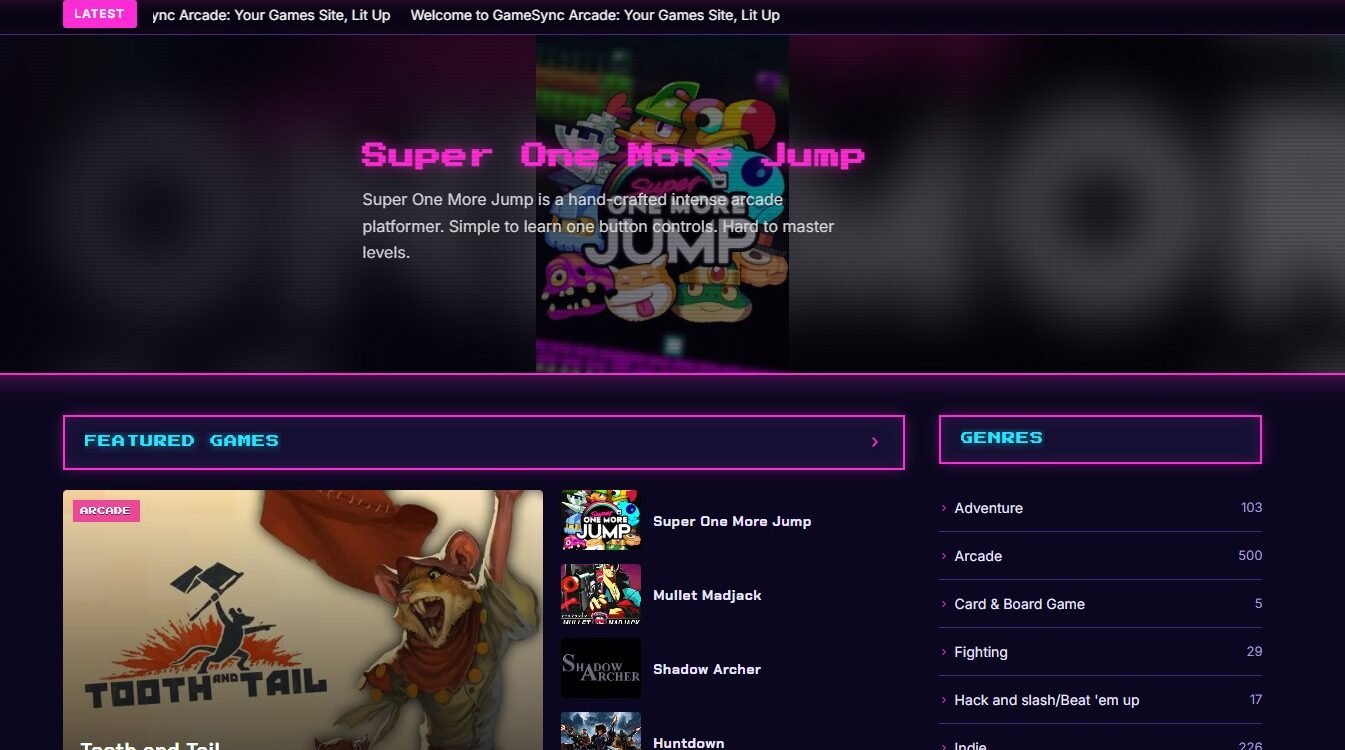
Welcome to GameSync Arcade: Your Games Site, Lit Up
Welcome to GameSync Arcade, a neon theme for gaming news and game databases. It runs on a near-black background with glowing colour, pixel-font banners and cards that light up when you point at them. Here’s a quick tour. Everything is managed from the theme settings, so there’s no code to touch.
A homepage that plays like an attract screen
The big hero slider shows your featured games, with a pause button, a pause on hover, and a first image that loads fast. An optional news ticker under the header scrolls your latest posts. Below that, drag your homepage sections into any order: featured games, latest games, latest news, most exciting games and a row for each genre.
Your sidebar, your rules
The sidebar is built from blocks you can reorder or hide: upcoming games, latest games, genres, Most Viewed or Trending This Week, newsletter, follow-us links and ad slots. Put it on either side. On phones it stacks under your content.
Grid or list, the reader chooses
Visitors can browse games as big glowing thumbnails or as a compact list, and every genre and platform keeps its own colour tag. You can also lock the site to one view if you prefer.
Built for game data
Pair Arcade with GameSync Game Data Importer and every game page fills in by itself: cover art, screenshots, trailers, developers, publishers, release date, Steam, GOG and Epic buttons, and Related Links. Add the Game Ratings, Related Games and Review Breakdown plugins and your cards show audience ratings and critic scores.
Features for your community
Members can favourite games and mark them Want to Play, Playing or Completed. There are public profiles, a My Account page, a newsletter signup and a contact page, all in the same neon style.
Make it earn
Arcade has five ad slots, three in the sidebar and two on the homepage. Label them, place them, and hide them from logged-in members. A slot with nothing in it shows nothing.
Your look
Arcade is always dark; that’s what makes the glow work. Pick one neon accent colour and it tints the banners, buttons, links and glows across the whole site. Social links and footer text are on the same settings screen.
Ready to play? Open GameSync Arcade in your WordPress admin, explore the settings tabs, and replace this post with your own first story.
